
Hey guys!
Good morning!
Today I came across a situation in which the use of sequences, old acquaintances of mine from Oracle and which from SQL Server 2012 were introduced in Microsoft's DBMS, I saw a perfect solution to the problem I was facing.
Introduction – Detailing the Problem
This problem consisted of a table with tens of millions of records and which has a sequential number to control and uniqueness of the record and now there was a need to create another sequential number in this same table, independent, where the existing records should receive NULL and which would start at 1, to control another type of information and be filled only when a certain event occurs (different from the already existing sequential number, which is generated with each insertion into the table)
Another situation that must be avoided at all costs is that no two sessions can take the same sequence and write to the table and this possibility is quite possible, since this table has several insertions in parallel sessions per second.
In this case, the use of IDENTITY would not be possible, since IDENTITY is applied to all records in the table, which would not be the case. The use of ranking structures such as ROW_NUMBER could even be viable, if it weren't so cumbersome to calculate this ranking with each new insertion (in addition to the possibility of two sessions getting the same sequence).
Differences between Sequence and IDENTITY
| SEQUENCE | IDENTITY |
|---|---|
| It is an independent object, which can be used to fill any column (including more than one in the same table) of the integer type (int, bigit, smallint, tinyint, decimal with scale 0 or numeric with scale 0), from one or more tables | It is associated with a column of a table |
| It is populated when called. In other words, it can be populated at each insertion or only when some condition is met | It is populated in each insertion |
| When starting from an already populated table, previous records will not be changed | When started in the table, the entire column is populated with the sequential |
| Must be called manually to generate the sequential | The sequence is automatically generated |
| Has separate permissions | Does not require additional permissions beyond the table |
| Minimum and maximum value can be defined (Ex: From 1 to 100) | The maximum value is the limit of the column's data type |
| The sequence can be restarted automatically when reaching the maximum value (CYCLE parameter) | When reaching the maximum value, it is not possible to insert more records |
| A new sequence can be generated in UPDATE commands, if necessary | The sequence is generated only when INSERTing the data |
| Available starting with SQL Server 2012 | Available starting with SQL Server 6.0 (SQL 95) |
| The current value of the sequence can be The current value of the sequence can be queried through the sys.sequences view | querying through the sys.identity_columns view |
| The sequence value can be reset | The sequence value CANNOT be reset |
How to create a sequence
To solve the problem described above, I had the idea of creating a sequence, which is a database object specially created for this type of need. Unlike IDENTITY, you can use more than one sequence in the table and previous records are not changed. These were the reasons that led me to use this SQL Server feature to resolve this situation.
Let's see now how to create a sequence:
CREATE SEQUENCE dbo.[seq_Teste]
AS [INT]
    START WITH 1
    INCREMENT BY 1
    MINVALUE 1
    MAXVALUE 999999999
    CYCLE
    CACHE
GO
Parameters explained:
- START WITH: Defines the starting number of the sequence
- MINVALUE and MAXVALUE: Delimit the SEQUENCE limit with its respective maximum and minimum value. If the value is not defined, the maximum and minimum value of the chosen data type will be assigned.
- INCREMENT BY: Defines the amount that will be increased in the sequence. In the example above, the increment will be 1 by 1.
- CYCLE: The CYCLE property allows you to start a cycle again from the moment the MINVALUE and MAXVALUE properties are reached. In other words, upon reaching the value defined in MAXVALUE, the sequence will start again at the value of the MINVALUE parameter (when this occurs, duplicate values will be generated in the sequence, as the entire range has already been covered)
- CACHE: When using this parameter, SQL Server pre-allocates sequence numbers through the CACHE property, the default value for this being 15, meaning that the next 15 available values will be allocated in memory until they are used and the sequence already treats these numbers as used. When all CACHE numbers are used, 15 new values are allocated in memory again and so the cycle continues. It is worth remembering that if the instance is restarted, the numbers in the cache are lost and this “hole” remains in the sequence.
How to return the next number in a sequence
Returning the next number in a sequence is a very simple task:
SELECT NEXT VALUE FOR seq_Teste
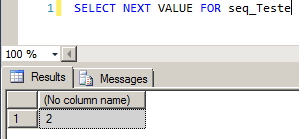
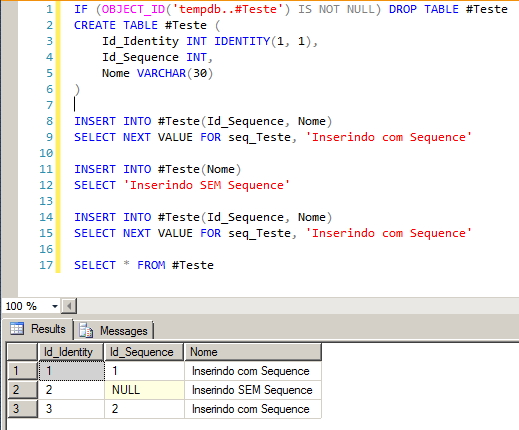
However, you must bear in mind that unlike IDENTITY, for each insertion you must call sequence to return the sequence and thus insert it into the table or create a default constraint to automate this task.
How to return the next number of a sequence automatically
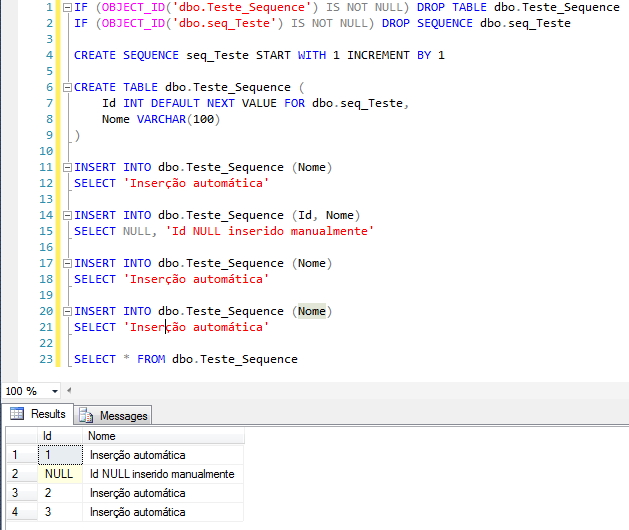
Although most people (myself included) use the sequence manually for each insertion to return the next sequence, this can be automated using a DEFAULT CONSTRAINT on the table:
CREATE TABLE dbo.Teste_Sequence (
    Id INT DEFAULT NEXT VALUE FOR dbo.seq_Teste,
    Nome VARCHAR(100)
)
Example:
How to reset the sequence value
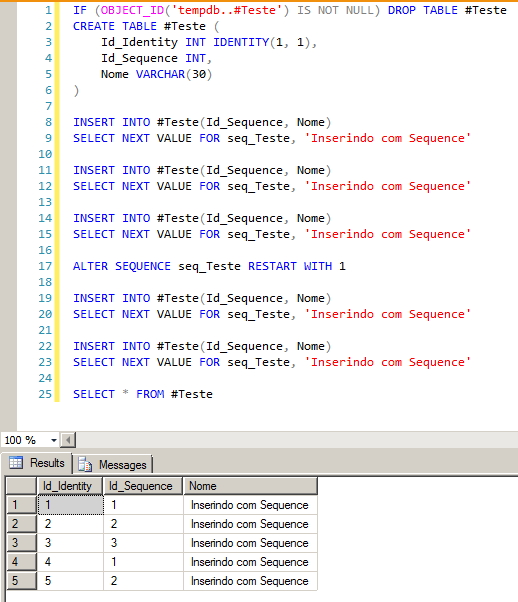
At times, it is necessary for the sequence counter to be reset or changed to a specific value. To do this, we can use ALTER SEQUENCE for this task:
ALTER SEQUENCE seq_Teste RESTART WITH 1
In the example above, we are resetting the sequence value to 1.
Example:
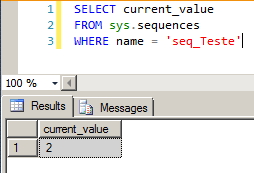
Retrieving the current value of the sequence, without increasing the sequence
To retrieve the current value of the sequence, simply query the sys.sequences view:
SELECT current_value
FROM sys.sequences
WHERE name = 'seq_Teste'
How to change a sequence
Changing a sequence follows the same parameters as creation and can be changed at any time.
Examples:
ALTER SEQUENCE seq_Teste MAXVALUE 99999
ALTER SEQUENCE seq_Teste CACHE
How to delete a sequence
Removing a sequence in the SQL Server database is as simple as any other database object and can be done using the DROP statement:
DROP SEQUENCE dbo.Sua_Sequence
GO
Sequence permissions
As already mentioned, sequences are independent objects in the database and therefore also have independent permissions:
CREATE SEQUENCE: To create a sequence, you must have CREATE SEQUENCE, ALTER or CONTROL permission on the schema. Users of the db_owner and db_ddladmin roles can create, change and drop sequences and users of the db_owner and db_datawriter roles can use sequence to return the next number in the sequence.
Grant example:
GRANT CREATE SEQUENCE ON SCHEMA::dbo TO [DOMINIO\usuario]
ALTER SEQUENCE: To change a sequence, you must have ALTER permission on the schema.
Grant example:
GRANT ALTER ON OBJECT::dbo.Sua_Sequence TO [DOMINIO\usuario]
DROP SEQUENCE: To delete a sequence, you must have ALTER or CONTROL permission on the schema.
Demonstration of a single sequence for more than one table
Test source code
CREATE SEQUENCE dbo.[seq_Pessoa]
AS [INT]
    START WITH 1
    INCREMENT BY 1
    MINVALUE 1
    MAXVALUE 999999999
    CYCLE
    CACHE
GO

CREATE TABLE dbo.Pessoa_Fisica (
    Id INT DEFAULT NEXT VALUE FOR dbo.seq_Pessoa,
    Nome VARCHAR(100),
    CPF VARCHAR(11)
)

CREATE TABLE dbo.Pessoa_Juridica (
    Id INT DEFAULT NEXT VALUE FOR dbo.seq_Pessoa,
    Nome VARCHAR(100),
    CNPJ VARCHAR(14)
)

INSERT INTO dbo.Pessoa_Fisica (Nome, CPF)
VALUES('Dirceu Resende', '11111111111')

INSERT INTO dbo.Pessoa_Juridica (Nome, CNPJ)
VALUES('Dirceu Resende Ltda', '22222222222222')

INSERT INTO dbo.Pessoa_Fisica (Nome, CPF)
VALUES('Dirceu Resende 2', '33333333333')

INSERT INTO dbo.Pessoa_Juridica (Nome, CNPJ)
VALUES('Dirceu Resende ME', '44444444444444')

SELECT * FROM dbo.Pessoa_Fisica
SELECT * FROM dbo.Pessoa_Juridica
Result

That's it, folks!
I hope you liked it and until the next post.
Note: Do you need to use a sequence in a user defined function, be it scalar, aggregate or table-valued and are unable to do so? See the solution in the post Using sequences in user defined functions in SQL Server 🙂
sql server sequence how to use work restart reset create delete change return get current value next value
sql server sequence how to use work restart reset create delete change return get current value next value

Comments (0)
Loading comments...